In my earlier post about AutoPR, I described what I was trying to build: a staged, asynchronous workflow that turns a ticket into a pull request without forcing me to supervise a terminal session the entire time.
That idea has not changed.
What has changed is the architecture underneath it, and a few things I kept running into as I used the tool on real work.
The problem with hardcoded states
The original version of AutoPR had its workflow embedded in the application logic. The states were fixed: fetch ticket data, investigate, implement, generate a PR. The actions available at each step were fixed too.
That worked well enough to validate the concept. But once I started using AutoPR across a few different repositories with slightly different conventions, the rigidity became obvious.
Some projects needed a different sequence. Some needed extra review steps. In one case I wanted to add a pre-implementation check that ran the test suite first. None of that was possible without modifying the source code.
So I rewrote the workflow layer from scratch.
A config-driven state machine
In v3 the workflow is no longer hardcoded. It is driven by a YAML config that lives outside the binary.
AutoPR resolves workflow config using a three-level hierarchy: first the repository’s own .auto-pr/workflow.yaml, then the global ~/.auto-pr/workflow.yaml, and finally the embedded default. The first match wins.
A state in the config looks like this:
states:
  - name: investigation
    display_name: Investigation
    prompt: prompts/investigate.md
    primary_artifact: investigation.md
    actions:
      - label: "Provide Feedback"
        type: provide_feedback
      - label: "Approve"
        type: move_to_state
        target: implementation
      - label: "Decline"
        type: move_to_state
        target: cancelled
Each state has a name, an optional display name shown in the UI timeline, a prompt file, and a list of actions. Three action types exist right now: provide_feedback collects a message and reruns the current state with that context; move_to_state transitions to another state; run_script runs shell commands and dispatches a sub-action based on exit code.
The same three-level hierarchy applies to prompts as well. That means you can override individual prompt files per repository without touching anything else.
What this gives you in practice is a workflow layer you can actually tune. If the default investigation step does not ask the right questions for a particular project, you adjust the prompt locally. If you want a validation gate between investigation and implementation, you add a state.
Provider sessions
The other structural change that mattered was how providers maintain context across workflow runs.
In the original version, each state transition was a fresh call to the AI provider. The provider got the prompt and the accumulated artifacts, but there was no persistent session. Context had to be reconstructed from disk on each run.
In v3, providers can maintain a session across state runs.
The session config is defined in the provider block:
providers:
  codex:
    command: codex
    args: ["exec", "-"]
    session:
      init_args: ["exec", "-", "--json"]
      resume_args: ["exec", "resume", "", "--json"]
      id_source: jsonl_first
      id_field: payload.id
      result_source: jsonl_last
      result_field: content
      result_event_type: assistant
On the first run of a ticket, AutoPR uses init_args and extracts the session ID from the provider’s output. On subsequent state runs for the same ticket, it uses resume_args with that ID. AutoPR handles the extraction automatically based on id_source and id_field.
The practical effect is that the model carries forward its understanding of the codebase between the investigation and implementation phases rather than starting from scratch. That reduces the amount of reconstructed context the prompt needs to carry and makes the transitions feel more coherent.
Sessions are optional and disabled by default if not configured, so providers that do not support them continue to work exactly as before.
CLI and integration changes
The old command set has been consolidated. In previous versions, there were separate subcommands for each workflow action: auto-pr approve, auto-pr feedback, auto-pr reject, auto-pr resume, auto-pr pr, and auto-pr apply-pr-comments. In v3, these are replaced by a single command:
auto-pr action <ticket> --label "Approve"
The label maps directly to the actions defined in the workflow config, so the available CLI vocabulary stays in sync with whatever workflow you have configured rather than being baked into the binary.
From MCP to CLI tools
The previous version used MCP for Shortcut integration. In v3, that is gone. Ticket discovery is now driven by a configurable discover_tickets_command — by default the short CLI, or a plain curl call against the Shortcut REST API. GitHub operations go through the gh CLI in the same way.
This turned out to be a meaningful improvement for a reason that is not immediately obvious: token usage.
MCP servers require the model to first discover what tools are available before it can use them. That discovery costs tokens on every run. A CLI tool skips that entirely — you tell the model in the prompt exactly what command to run and what the output looks like, and it goes straight to executing it. In practice, this makes individual runs noticeably cheaper and faster.
The debuggability improvement is just as real. With MCP, when something goes wrong between the model and the ticket provider, the failure is buried inside a layer you cannot easily inspect. With a CLI tool, you can run the exact same command yourself, read the output, and verify it matches what the model should be seeing. If the prompt’s instructions about parsing that output are wrong, you can fix them and rerun without touching any code. The iteration loop is much tighter.
Usage limit detection
One small thing I added that turned out to be more useful than I expected: AutoPR now detects when a provider hits a usage limit and surfaces it as an actionable error rather than a generic failure.
Before this, a rate-limit or quota exhaustion would just fail the job and leave the ticket in a failed state with a wall of raw output to dig through. Now AutoPR identifies that specific condition, marks it clearly in the UI, and tells you what to do rather than leaving you to decode the output.
It is a minor thing, but it removes a real source of friction when running several tickets in parallel.
UI changes
The web UI picked up two things that changed how I actually interact with tickets day to day.
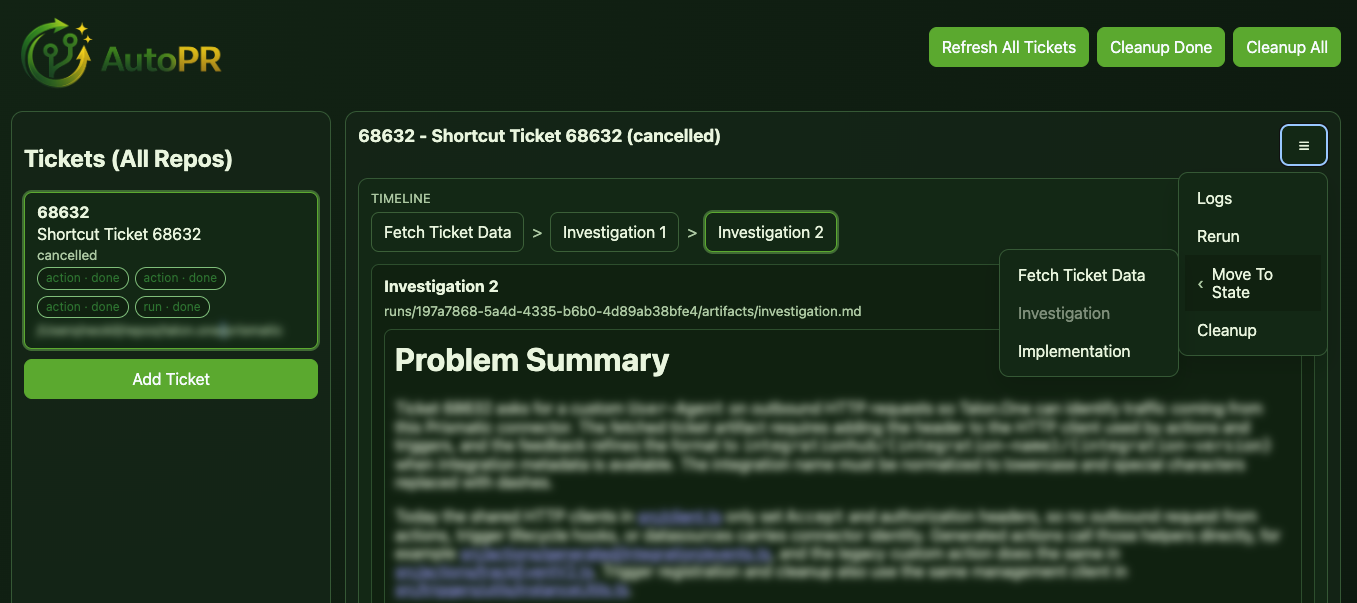
The first is a workflow timeline. When you open a ticket, you can see a trace of every state it has passed through: completed states and the current one. Future states are intentionally not shown — because the workflow is configurable, the path ahead is not fixed, so there is nothing reliable to display.
The second is a burger menu on each ticket that exposes a set of escape hatches for when things do not go as expected. You can open the execution logs to see exactly what the provider did, rerun the current state if you want to retry without changing anything, or jump the workflow to any state directly. That last one in particular is useful when a run goes sideways halfway through and you want to resume from a specific point rather than starting over from the beginning.
The workflow action buttons remain driven by the config — whatever actions you define for a state in the workflow YAML are what appear. But the escape hatches in the menu are always there regardless of state, so you are never fully stuck.
A third addition is a Discover Tickets modal. Rather than dropping to the terminal to add a new ticket, you can search your ticket provider directly from the dashboard and queue it from there. It filters for stories that carry the auto-pr label, so the list stays relevant without extra configuration.
What did not change
The core design is the same.
AutoPR still runs ticket workflows in the background. It still breaks the work into staged checkpoints where you review before the model moves on. The proposal step before implementation is still there. The web UI is still a dashboard, not a chat window.
The things that changed are all infrastructure: how the workflow is defined, how providers maintain context, how the UI reflects state. None of that touches the underlying idea that staged asynchronous workflows are more useful than one long agent session.
What comes next
The honest answer is that v3 made things more powerful but also more complex to set up.
The provider session config, in particular, requires you to understand how a specific provider serializes its output before you can wire it up correctly. That is fine if you enjoy reading JSON schemas, but it is a real barrier if you just want to use Codex or Claude Code and get going. I want to ship built-in presets for known providers so the common case requires no manual config at all, while still leaving the full config surface available for anything else.
The same applies to the workflow config. The YAML gives you a lot of control, but the default is also more intimidating than it needs to be for someone starting fresh. I want to make the getting-started path simpler without removing the flexibility for people who actually need it.
The other thing I want to add is support for multiple named workflows. Right now, there is one workflow per installation. What I want instead is the ability to define several — a ticket refinement workflow, a feature implementation workflow, a separate flow for bugs — and choose the right one when you add a ticket to the queue. The config model is already close to supporting this; it is mostly a matter of adding the routing layer on top.
Beyond that, I am not planning far ahead. AutoPR gets used on real work every day, and that tends to surface the next thing worth fixing more reliably than any roadmap would.
The project is at github.com/Neokil/AutoPR if you want to follow along or try it.